
 Written by
 Hello everyone!
I just finished the OPML for all the blog URLs. I am excited to add it to my Feedly and dive into your blogs this term.
There may be one or two updates but I wanted to get this out to you all. Let em know if I missed one of the student blogs!
All the course activity and posts can seem like a raging waterfall but utilizing a feed reader will help you!
SO – here’s how it works…. I would strongly suggest using a feed reader (like Feedly) for our course and for the future. You can easily import the class OPML into your reader and have access to all the student blogs and our main course blog in a “collection.” Then, you may want to find other blogs to follow as you grow your own professional and personal set of feeds. I read all kinds of entertainment, tech, and lifestyle blogs/sites in my feeds. Using feeds is a very useful skill for future information professionals.
We have a full and rich roster of folks. We used first names in the feed titles because it helps me get to know you all. Note: I hope we didn’t make any mistakes!!
I would suggest downloading it to your desktop (via whatever method of mouse clicks you use on your computing platform) and then importing the file into reader of your choice. Make sure the file extension is .opml I suggest Feedly and use it in the steps below.
So here’s the challenge to some fearless #hyperlib student – please add the OPML to your reader and report back here in a comment!
For some background, view this video:
Second, follow these steps if you are using Feedly:
- Set up an account with Feedly
- Read over this helpful page: https://blog.feedly.com/opml/
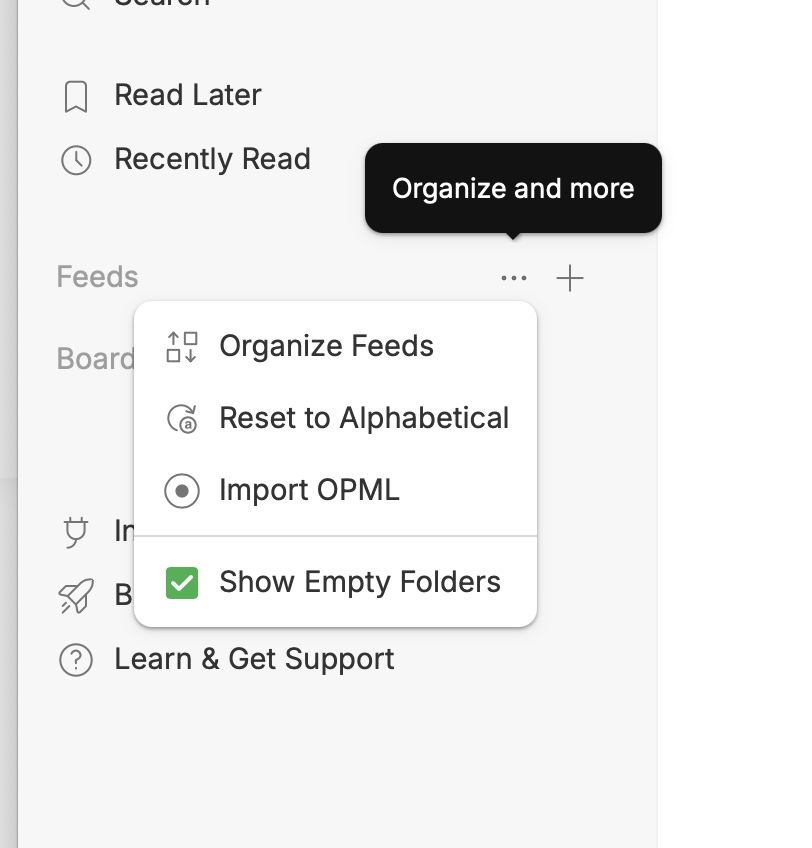
- On the left sidebar click on … next to Feeds.
- Locate the import OPML button on top right
- Click on Import OPML and locate the file you saved above or drag and drop the file if your browser supports that functionality.
- Follow the directions on the import screen: Choose file and Import
- You are ready to go!
Other sites will import differently but the OPML is a standard file type.
Image: Snoqualmie Falls, Washington in the 70s



I did it and it was painless!
@camillewedin thank you for diving in. 😀😀😀
@michael Agreed! totally painless … and “it brings on lots of changes …”
@tbgoodwillie Very cool! Thanks for trying it out.
@michael This was super easy. I haven’t used a program like this but it definitely makes it easier to find posts from everyone. Thanks for sharing.
@lwilliams yay! One of the things I do with this class is offer everyone some experience with awareness tool such as this. I appreciate you getting it set up.
Got that set up! I’ve never used a program like this, it will be interesting.
@literarylady hurrah! Thanks for trying it out.
@michael Hi Dr. Stephens, I’ve successfully used RSS feeds before, but chunks of time are missing from my Feedly for the HyperLinekd Library Course Blog. I see “Class Chat Link” from today 8/30, “…and I Feel Fine!” from yesterday 8/29, but then it skips to July 29, 2026 all the way back to posts from August 2013. Is anyone else running into the issue of not seeing all the August 2026 posts?
Update: what seems to be happening is the Hyperlinked Library Course Blog Posts are being interfiled with the Site-Wide activity channel. @michael Dr. Stephens, is there any way for you to update this on your end? I’m having a hard time wading through all site activity for just your announcements. It’d really help me to have the course blog posts separate from comments, join notifications, etc. Thank you so much.
@innerchildlibrarian please see the post I put up on the course blog. I did some troubleshooting and I’m interested to see if the new URL for the RSS feed helps if not, I’ll have to discuss with IT support — that may take some time. I see the same thing with the older course posts, but that must be embedded in the feed. For now, if the new URL does not work, I would suggest monitoring the course posts via our site.
@michael Good afternoon, after following your newest post’s instructions, the issue I described still remains. I will follow your suggestion to monitor course posts via the home page. Thanks!
@innerchildlibrarian here is a workflow that I think would work well for you just to see the course blog posts.
https://287.hyperlib.sjsu.edu/community/activity/
Pull down on the right hand side from “everything” to “posts”