About This Document
This document, presented to the Cozy Afternoons Public Library Planning Committee, serves as a strategic plan to install a makerspace in Cozy Afternoons Public Library. In this document, we will review our library’s mission, the goals of this project, along with the timeline, training, and additional details related to the implementation of this new service.
Introducing the Cozy Afternoons Makerspace!
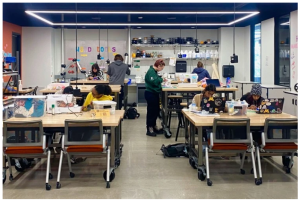
What is a Makerspace? “A MakerSpace is considered a place where informal, collaborative learning and discovery take place through hands on creation, via use of any combination of art and technology. MakerSpaces facilitate both analog (low-tech) and digital (high tech) creation” (Velasquez, n.d., para. 1). To give some examples of the equipment in makerspace, some high tech options may include 3-D printers and sewing machines while low tech options may include general art supplies or even legos (Makerspace.com, n.d.).
So what does a Makerspace look like? Below is an image of one of the University of Minnesota’s Makerspaces in their Health Sciences Library (University of Minnesota Libraries, n.d.-a). This is just one room of the Makerspace called the “work zone.” Notice the large tables, supplies laid out, sewing machine, and students working. This image captures the essence of a Makerspace which “facilitates creativity, experimentation, participation and play” (Velasquez, n.d., para. 4).
Our Goals and Objectives:
-
- Meet the needs of our community by providing free space, up-to-date equipment, staff assistance, and materials to pursue creative projects
- Make arts and other creative pursuits more accessible by removing financial and technological barriers
- Foster community connections through shared workspaces and experiences
Our Intended Users:
-
- The makerspace will be geared toward the young adult and adult members of our community
At Cozy Afternoons Public Library, our mission is to:
-
- Provide services and resources that meet the needs of ALL members of our community.
- Promote learning and creativity by removing barriers and providing relevant resources and services.
- Provide space and experiences that foster community connections.

How does a Makerspace fulfill our mission?
Stephens (2004) article titled “Technoplans vs. technolust” discusses the importance of a library technology plan that aligns with the libraries mission in order to avoid “technolust.”
So how does the Makerspace align with our mission?
-
- We listened to our patrons and they feel there is a lack of space for their own creative pursuits in the library.
- We have not stayed up to date in regard to technology to meet our patrons’ creative needs and it is important that we do. While Velasquez (n.d.) is speaking of teens in libraries, she makes an important point that can be taken into consideration for all library patrons when she states, “simply providing desktop computers and Internet (a connected box without context) does not satisfy the technology needs of teens” (para. 4).
- A Makerspace would fulfill several aspects of our mission: promoting learning and creativity, removing barriers, and providing relevant resources/services
Action Brief Statement:
Convince the young adults and adults in our community that visiting our Makerspace will allow them to pursue their creative hobbies (or create new ones), learn new skills, and connect with their community because we will fulfill our mission to them to provide the necessary resources and services (space, technology, and supplies) that are based off the needs that they have communicated to us.
Inspirational Institutions
-
- University of Minnesota Libraries Makerspaces: (University of Minnesota Libraries, n.d.-a)
- Bootcamp, workshops, discord
- No appointments (with some exceptions)
- George Latimer Central Library Innovation Lab (Saint Paul Public Library, n.d.)
- Appointment required
- Digitization equipment
- Cincinnati & Hamilton County Public Library (Cincinnati & Hamilton County Public Library, 2026)
- Lots of wide open space and large tables for working
- Several patrons in video mention how helpful the staff are
- University of Minnesota Libraries Makerspaces: (University of Minnesota Libraries, n.d.-a)
-
- Tulsa City County Central Library Maker Space (Joie Bettenhausen, 2025)
- Training idea: orientation required for first time users
- Policy idea: at least 18 years old without parent supervision, younger needs parent supervision
- Tulsa City County Central Library Maker Space (Joie Bettenhausen, 2025)
-
- Tour Our School Library’s Brand New Makerspace! (School Library Talk with Megan, 2025)
- “Makerspace preview event” to encourage collabs with teachers
- Mentions 3-D printer vendor provided installation/training
- Mentions hanging rules/expectations sign on wall
- Drawers/storage containers and organizers
- Mentions consulting other libraries about equipment/supplies they purchased and recommend
- Arts and crafts area (scrapbooking paper, clay, calligraphy, crochet, knitting, etc.)
- Ask for supply donations
- Tour Our School Library’s Brand New Makerspace! (School Library Talk with Megan, 2025)
Guidelines and Policy Considerations
-
- Will we require appointments to use equipment?
- How old do patrons have to be to use the equipment without parent supervision?
- Will we require patrons to do training prior to using the equipment?
- What are the rules for using the Makerspace?
- Do we need to hire staff for the Makerspace?
Timeline
| Months 1-2: User Survey | Conduct and analyze user surveys to determine what equipment/supplies patrons need |
| Months 3-5: Equipment Purchases | Based on user survey, purchase equipment/supplies. Gather other necessary items for room: tables, chairs, storage, etc. |
| Month 6: Design the Space | Install equipment, organize supplies, design room layout |
| Month 7-8: Staff Training | Staff equipment training. Staff should create user tutorials for patrons for each piece of high tech equipment |
| Months 9-12: Logistics/Policy Planning | Determine policies for the Makerspace: age requirement, appointments?, workshops? These months can also be used if other phases of the timeline took longer than expected |
| Month 13: Launch! | Makerspace opens at the beginning of Month 13 |
Timeline Notes:
-
- We are striving for a 1 year planning timeline from start to launch. This, hopefully, will give staff enough time to prepare without extending the process for too long. In his article, “Taming Technolust: Ten Steps for Planning in a 2.0 World,” Stephens (2012) emphasizes the importance of not overthinking/overplanning every detail of launching a library technology service.
- Months 1-2 include conducting user surveys. Staff should be surveyed as well. Casey and Savastinuk (2007) discuss the value of staff insight about patron needs since they are in direct contact with them.
- Months 7-8 include creating user tutorials for the equipment. The University of Minnesota Libraries has an online bootcamp series for their Makerspaces (University of Minnesota Libraries, n.d.-b).
- Months 9-12 mentions offering workshops. The University of Minnesota also offers a series of in-person workshops (University of Minnesota Libraries, n.d.-b).
Marketing & Promotion
A. Promotion to Staff:
-
- Staff will receive frequent updates throughout the implementation process. Stephens (2004) explains how communication, including staff updates, helps “buy in” staff (“Buy in, not out” section).
- Staff “preview” party: In her library Makerspace, Megan talks about having a “Makerspace preview event,” for teacher buy-in (School Library Talk with Megan, 2025, 2:00). A similar thing may be useful to show staff how great the space is.
B. Promotion to Patrons:
-
- Launch party (similar to what is described in the “promotion to staff” section)
- Display artworks that patrons or staff have completed in the Makerspace throughout the library. Include signage about how these creations were made.
- In “The Heart of Librarianship,” Stephens mentions a Pew Research Center’s Internet & American Life Project report from 2013 that found that library patrons prefer that libraries “use the channels they use–Facebook and e-mail, specifically” (Zickuhr et al., as cited in Stephens, 2016, p. 10). We will focus on advertisement through email and social media for the Makerspace, making sure to upload many pictures of the space and completed projects.
Staff Training
-
- Staff will need to know the equipment basics: set-up, use, troubleshooting
- Useful skills: tech-savvy and good at problem-solving
- Initial training will be provided by the equipment vendor. In her Makerspace tour video, Megan says she was trained on the 3-D printer by the vendor and found it useful (School Library Talk with Megan, 2025). For additional information, staff may need to consult the internet, YouTube or other online resources.
- Staff do not need to know how to do every craft for which we provide supplies for (ex: we can have supplies for knitting, but staff do not need to know how to knit)
Evaluation and Looking Toward the Future
-
- To understand the impact of the Makerspace, we will evaluate:
- The number of visitors and repeat visitors to the Makerspace. Casey and Savastinuk (2007) mention “door counts” as one statistic that can be used to evaluate a library service (p. 32-33).
- Suggestions made through a feedback box in the Makerspace. Casey and Savastinuk (2007) mention a “customer comment card” as one way to obtain patron feedback (p. 31).
- Feedback staff collected from patrons through conversation, which Casey and Savastinuk (2007) describe as a form of “indirectly solicited feedback” (p. 31).
- Feedback will be compiled and analyzed by the Cozy Afternoons Public Library Planning Committee and a presentation given to Makerspace staff. Necessary changes will be made in response to feedback
- Envisioning growth
- If we find the Makerspace is useful to patrons, we would like to grow the space and add more staff, equipment, and supplies as needed
- To understand the impact of the Makerspace, we will evaluate:
References
Joie Bettenhausen. (2025, April 23). Library maker space [Video]. YouTube. https://www.youtube.com/watch?v=wxeUncaDJZo
Casey, M.E., & Savastinuk, L.C. (2007). Library 2.0: A guide to participatory library service. Information Today Inc. https://287.hyperlib.sjsu.edu/wp-content/uploads/2019/07/Library2.0Text.pdf
Cincinnati & Hamilton County Public Library. (2026, April 24). Library feature: How the MakerSpace supports workforce development and entrepreneurship [Video]. YouTube. https://www.youtube.com/watch?v=YkaWDjxB4wU
Makerspaces.com. (n.d.). What is a Makerspace? https://www.makerspaces.com/what-is-a-makerspace/
Saint Paul Public Library. (n.d.). Innovation lab equipment & software. https://sppl.org/innovation-lab-equipment/
School Library Talk with Megan. (2025, April 12). Tour our school library’s brand new Makerspace! [Video]. YouTube. https://www.youtube.com/watch?v=z-NmUv682qU
Stephens, M. (2004, November 1). Technoplans vs. technolust. Tame the Web. https://tametheweb.com/2004/11/01/technoplans-vs-technolust/
Stephens, M. (2012, May 30). Taming technolust: Ten steps for planning in a 2.0 world (full text). Tame the Web. https://tametheweb.com/2012/05/30/taming-technolust-ten-steps-for-planning-in-a-2-0-world-full-text/
Stephens, M. (2016). The heart of librarianship: Attentive, positive, and purposeful change. ALA editions.
Velasquez, J. (n.d.). MakerSpaces: New tradition in context. International Federation of Library Associations and Institutions. https://www.ifla.org/g/libraries-for-children-and-ya/makerspaces-new-tradition-in-context/
University of Minnesota Libraries. (n.d.-a). Makerspaces. https://www.lib.umn.edu/spaces/makerspaces
University of Minnesota Libraries. (n.d.-b). Maker bootcamp. https://sites.google.com/view/makerbootcamp/home?authuser=1