What is the idea? Integrating monitors or tablets as digital aspects of the already existing book displays in a public middle school library.
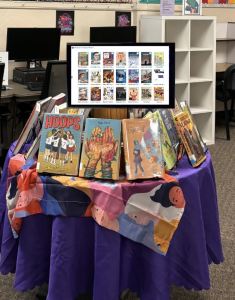
Image above is a crude digital rendering of what a possible digital display could look like with a monitor displaying the Women’s History Month topic wall on the digital display along side the physical books. Credit: Sofia Solares
- Integrating digital elements, maybe interactive, into promotion displays. Displays will slideshow through reviews left by patrons, check out status, specific OPALS pages, and any other relevant information regarding the display
- Bringing not just more, but different and intentional technology into the library in an innovative way
- The goal is to get more patron engagement with OPALS, the library’s online catalog and management system.
- OPALS is the library’s integrated library system (ILS). It’s an HTML based system that while a little clunky at times, works really well for our library’s needs.
- Making technology tangible and seen in more places than just the browsing stations
- Additional goal would be to circulate more books that haven’t been circulating recently
- Could be a non-instructional/non-classroom information and media literacy lesson
- The community it is serving is everyone in the middle school, students, teachers, and library staff mainly but all can participate theoretically
- This helps the students in their educational goals that are already being worked on in class. It reinforces skills taught and used in the classroom and makes them relevant in a different space.
- Provide more creative spaces and a new medium for creativity for the library staff to promote their program and monthly features
This innovation is hyperlib because it expands the user centered OPALS project into the physical library. It also brings the user into the final stages of the OPALS project by getting patrons involved in using all the features the ILS has to offer. The end goal is that the digital poster displays will inspire new types of connections between library staff and patrons. Also ultimately getting more OPALS engagement and links between patrons and the ILS in new ways
Mission & Institutional Context
Mission Statement: “The MHMS Library is a welcoming, inclusive space where students of all abilities can explore, learn, and grow. We foster a love of reading, support media literacy, and provide resources that enhance learning. Through collaboration with students, educators, and the community, we offer dynamic programming that encourages creativity, communication, and lifelong learning.”
The library has been undergoing a large change in the form of de-emphasising dewey for the non-fiction collection and is working on genrefying the whole library to make browsing and discovery more accessible for students. Part of the motivation for this innovation would be to help patrons learn about the new sections in the library. For example, during Non-Fiction November, there could be a display of new arrival non-fic books where the digital posters display a map of the library and in what section a book can be found. Eventually, there might be digital displays in each section of non-fiction that can help patrons find their way around, highlight a low-circulating book or new arrival, or locate a specific book in that section with some prompting.
The main idea is to get patrons more involved with OPALS, our integrated library system and online catalog. Part of the genrefying project has been a lot of data clean up of the MARC records of circulation items, book lists, pathfinders, and topic walls all found in OPALS. Now that they are a lot “prettier” and have been aligned with our accessibility and findability goals, it would be a shame not to show them off in a new way through the digital displays.
The next step of the OPALS overhaul would be to begin using the features available on it again, specifically the book reviews. If we incentivize leaving book reviews on OPALS with the chance to be shown on a digital display (and also maybe a sticker or jolly rancher or something as well) there would be more engagement with that feature.
The library has also been looking for more ways to collaborate with classroom teachers, and having a review writing “assignment” would be a win-win collaboration for all.
Action Brief Statement
For target audience: Convince middle school students that by leaving reviews in OPALS they will learn more about how their library catalog works (and also win prizes) which will create more engaged readers because the library is more than just a room full of books but also an additional learning space in the school.
For staff: Convince middle school teachers that by motivating students to leave reviews in OPALS they will practice their writing and reading comprehension skills which will create more engaged readers and help meet ELA standards because the library is a partner with teachers and can be a fresh alternative to “traditional” methods of ELA skills teaching and practicing.
For library staff: Convince the library team that by integrating digital posters in displays they will get more flexibility and opportunities to be creative with display designs which will create more engaged patrons and lead to higher food traffic because the library is mission driven to “offer dynamic programming that encourages creativity [and] communication”
Where did you find inspiration?
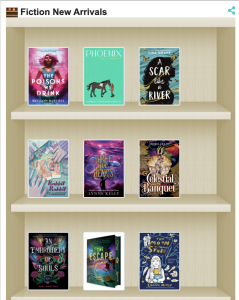
- I was somewhat inspired by some features that OPALS already has, like the digital bookshelves we have on the home page
-
- I believe these were a pandemic era introduction from OPALS developers that we still use
- Similarly, this article talks about digital book displays during the pandemic and I thought what if we still had this but it was part of a physical display also
- I was inspired by the info lit and learning class I took and how to implement info lit into various programs that can happen outside the classroom. The integration of “real-time” feedback and demonstration of where your writing and thoughts can go is a cool feature that our library can utilize.
- Our school district right now is experiencing a transition period specifically with EdTech so I didn’t want to introduce an innovation that was “super techy” and adds fuel to the fire, so to speak. But I did want to find a way for patrons to get to see OPALS more outside of the browsing stations and their own Chromebooks, so having them displayed on monitors or tablets that have very limited functions would be a way to do that.
- At the Monterey Bay Aquarium they have a wall that displays pictures from the MBARI instagram that if you tap on will open the whole post so you can read the caption. We probably wouldn’t be able to get to that level, but the minimal interactivity could be a cool feature. I was unable to find links to this “exhibit” online but it is part of the Open Ocean and Into The Deep sections.
Guidelines & Policies
- There wouldn’t need to be any specific “usage” guidelines since the displays would be seen only, not interacted with
- Implementation guidelines
- Displays typically stay up for 3 weeks to a month, digital displays would be the same
- For ease of viewing, digital displays would only have 1-5 slides of rotating information OR be an interactive display with minimal features that only open OPALS records or specifically coded findability exercises
- This would be the current digital bookshelves found on the OPALS home page but on a new, hopefully more engaging, platform
- Everything put on the displays would be reviewed by the library team and manually chosen to be displayed on the monitors/tablets
- For the reviews
- The teacher librarian and classroom teachers will collaborate on requirements for book reviews
- The library team would be the ones reading and approving reviews and choosing which to include in the digital displays
- Operational issues to address
- Assumption is that they will continuously be connected to power
- How to wire things?
- These displays are permanent and updated remotely
- Make sure library staff has operational training
- How much of a burden will this be on the IT team?
- How much training can the library team have to not rely on IT so much once the digital displays are installed?
- When a monitor/tablet stops working what do we do? How do we pivot the display?
- Would there be replacements? What’s the priority for replacing them (how fast can it get fixed)?
- Are they on all night? Should they be? Probably not…
- How will this impact opening and closing procedures?
- Assumption is that they will continuously be connected to power
Timeline for Implementation
- Procurement and set up of technology – 3 weeks to a month
- IT and Teacher Librarian
- Testing of tech and initial customization of digital displays – 1 to 2 weeks
- IT and library staff
- Training on how to use digital displays – 1 day
- IT, Library staff, student library aides
- Initial display/Beta testing – 1 day to set up and 2 weeks of display
- Library staff
- Initial display evaluation – Same 2 weeks of display gathering input from patrons and library staff (convenience survey?)
- Library staff, student library aides
- Data processing from evaluation survey and input – 1 week
- Library staff
- Implementation of feedback and further digital display roll out – 1-2 weeks
- IT, library staff, student library aides (maybe)
- Additional evaluation done as needed or at the beginning and end of a semester, which ever comes first
Marketing & Promotion
- Teacher librarian will make announcements at staff meetings
- Library staff will make promotion videos for MHTV (weekly school wide announcement show)
- The announcement of the new display tech will be sent out to families in both the school and library newsletters, which will in turn promote greater community engagement
- Demonstrations and introduction to the new tech will be done in scheduled book looks as well as one on one with patrons as they come in the library
- The main messaging regarding promotion of this innovation would be as the “next step” of the library’s transformation
- We’ve been working hard behind the scenes to make the library more accessible and intuitive, come see it in action
- With regards to the new non-fiction section, these new displays will help introduce you to what we’ve changed
- We want to continue making the library a hub for our whole community, become a part of it with your reviews being displayed on our new digital displays!
Staff Training & Readiness
- IT and the library team will work closely together to get things tested and make sure the vision of this innovation can become a reality
- Lots of time to test and play around with the features in OPALS and of the monitors and tablets will show what is realistically possible to do with the digital displays
- A one-sheet of how to use and how to troubleshoot will be created and easily accessible for every day use and further training for new staff
- Possibly even video tutorials for the tech heavy side
- Once the kinks have been worked out and an understanding of the limitations of the digital displays have been found, then the trainings will be expanded to include the student library aides on how to turn them on and off, and maybe how to edit what is displayed if the library team finds it is necessary
- Teachers will be shown how it works so they may make their own introductions to the innovation in their classrooms
- The existing tech ticket system will be utilized for any tech help needed, same with support needed from the OPALS side of things
Evaluation & Future Expansion
- Initial implementation will come with beta testing and immediate evaluation so feedback may be collected and implemented before it becomes a permanent fixture of the library’s displays
- Surveys gather data about patron satisfaction with the display and connectivity with the library
- Also maybe about if they think this is even worth it to have or if they think it’s a cool and innovative feature of the library
- The end goal is to get more interaction with OPALS and having better patron understanding of how the library functions so asking questions about that in a survey would also be helpful
- Also maybe about if they think this is even worth it to have or if they think it’s a cool and innovative feature of the library
- The success story would include seeing an increase in reviews posted in OPALS, books that haven’t been circulating get checked out, and having more foot traffic in the underutilized areas of the library, such as the non-fiction section
- Feedback will be shared amongst the library team as it comes in, with eventual communication to the whole community including teachers, staff, and parents.
- If the digital displays are very well received they may be expanded and introduced to more parts of the library
- Then maybe a different type of tech could be used that do not have the same limitations the first round of monitors/tablets have in order to meet different needs and do more things that may be thought of along the way
Hi Sophia,
I’m not familiar with OPALS but I do think this would be an interesting idea to implement with ELA students/teachers. It would give students a chance to think and write about something they enjoyed (or didn’t enjoy) reading. Posting a review to OPALS would give them a chance to practice writing an opinion in an informal way and might also encourage them to read new genres. Also, good idea aligning it with standards in your Action Brief for teachers! Nice work!
Iris
Hi Iris,
Thanks for your comment! I am realizing now that I didn’t include much of a background on OPALS which is my library’s integrated library system (ILS). It’s an HTML based system that while a little clunky at times, works really well for our library’s needs. A big reason I think this digital display system will work is because we have a close relationship to the developers at OPALS and could continue our partnership in the development of specialized displays that would go in the monitors/tablets. So when necessary we could create custom features that work just for our displays, but also possibly inspire OPALS as a company to offer something similar to their other clients.
I love this plan in theory and I so almost want to pitch it to my teacher librarian and admin team but I doubt we’d actually have the budget to make something like this happen… that’s what was so fun about this project was that I got to dream about what it would be like not having budget restraints! Oh what a world that would be!
This is a very cool idea! I especially like the idea of using student reviews as part of the digital displays. I remember the days when classrooms and the library displayed changes with each month and season. It seems like with all that is on the school librarian and teacher’s plates now, it has been left on the back burner. Adding a digital display, it would be ideal to do less work, but still be very relevant for what is happening in the library.
I especially like the idea of using student reviews as part of the digital displays. It creates a meaningful, participatory experience for students. Also, this idea does not just use technology for the sake of adding technology, but for a specific purpose and uses existing systems.
Hi Jana!
Thanks for your reply, I really appreciate your comments.
A good portion of my job as the Library Media Assistant is rotating the displays month to month so selfishly I wanted to pitch this idea because it would provide some ease (and new opportunities) to that part of role. Like you said, the digital displays would hopefully take some work off of plates, but if not it would ideally ignite some new creativity in playing with the new technology.
I agree! I love the idea of reviews as participatory and a way to get readers more meaningfully engaged. Recommendations or related books are also something that could be populated through the review process rather than just through metadata.